


reCAPTCHA v3 adalah tindakan keamanan baru yang tidak terlihat yang diperkenalkan oleh Google. Itu menambahkan captcha tanpa memaksa pengguna untuk menyelesaikan tantangan apa pun. Menggunakan konsep yang disebut “tindakan” untuk mengidentifikasi lalu lintas nyata dari lalu lintas bot.
Layanan kami sekarang mendukung Google reCAPTCHA v3. API ini cukup mirip dengan API token(reCAPTCHA v2). Hanya ada 2 parameter baru yang ditambahkan, satu untuk tindakan dan yang lainnya untuk skor minimal.
RECAPTCHA V3 Mengembalikan skor dari setiap pengguna, yang mengevaluasi apakah pengguna adalah bot atau manusia. Kemudian situs web menggunakan nilai skor yang dapat berkisar dari 0 hingga 1 untuk memutuskan apakah akan menerima atau tidak permintaan. Skor yang lebih rendah di dekat 0 diidentifikasi sebagai bot.
Parameter action di Recaptcha V3 adalah data tambahan yang digunakan untuk memisahkan validasi captcha yang berbeda seperti misalnya login, register, penjualan, dll.
Untuk saat ini, harga adalah $2.89/1k Recaptcha v3 tantangan yang diselesaikan dengan benar. Anda tidak akan ditagih untuk captcha yang dilaporkan dipecahkan secara tidak benar. Perhatikan bahwa harga ini hanya berlaku untuk Recaptcha V3 baru, jadi hanya pelanggan yang menggunakan API khusus ini yang akan dikenakan tarif tersebut.
Adalah parameter baru yang memungkinkan pemrosesan tindakan pengguna di situs web secara berbeda.
Untuk menemukan ini, kita perlu memeriksa kode JavaScript situs web yang mencari Call of Grecaptcha. Fungsi Execute. Contoh:
grecaptcha.execute("6Lc2fhwTAAAAAGatXTzFYfvlQMI2T7B6ji8UVV_f", {action: something})
Terkadang sangat sulit untuk menemukannya dan kita perlu melihat semua file JavaScript. Kami juga dapat mencoba menemukan nilai parameter tindakan di dalam objek konfigurasi ___grecaptcha_cfg. Kami juga dapat menghubungi Grecaptcha. Eksekutasi dan periksa kode JavaScript. API akan menggunakan nilai default "verifikasi" jika kami tidak akan memberikan tindakan dalam permintaan kami.
Skor minimal yang diperlukan untuk resolusi captcha. Kami merekomendasikan menggunakan nilai 0,3 Min-Score, skor lebih tinggi dari 0,3 sulit didapat.
Contoh lengkap TOKEN_PARAMS:
{
  "proxy": "http://127.0.0.1:3128",
  "proxytype": "HTTP",
  "googlekey": "6Le-wvkSAAAAAPBMRTvw0Q4Muexq9bi0DJwx_mJ-",
  "pageurl": "http://test.com/path_with_recaptcha",
  "action": "example/action",
  "min_score": 0.3
}
Respons memiliki struktur yang sama seperti captcha biasa. Lihat Polling untuk status CAPTCHA yang diunggah untuk detail tentang respons. Solusinya akan diberikan di dalam kunci text pada respons. Solusi tersebut hanya berlaku para satu kali penggunaan dan memiliki masa berlaku selama 1 menit.
    curl --header 'Expect: ' -F username=your_username_here \
                             -F password=your_password_here \
                             -F type='5' \
                             -F token_params='{"proxy": "http://user:[email protected]:1234",
                                               "proxytype": "HTTP",
                                               "googlekey": "6Lc2fhwTAAAAAGatXTzFYfvlQMI2T7B6ji8UVV_b",
                                               "pageurl": "http://google.com",
                                               "action": "example/action",
                                               "min_score": 0.3}' \
                             http://api.dbcapi.me/api/captcha
curl -H "Accept: application/json" http://api.dbcapi.me/api/captcha/CAPTCHA_ID'{"status": 0, "captcha": 2911096,
"is_correct": true, "text": "textSolution"}'
    # recaptcha_v3
    import deathbycaptcha
    import json

    # Put your DBC account username and password here.
    username = "username"
    password = "password"

    # you can use authtoken instead of user/password combination
    # activate and get the authtoken from DBC users panel
    authtoken = "authtoken"

    # to use socket client
    # client = deathbycaptcha.SocketClient(username, password)

    # to use authtoken
    # client = deathbycaptcha.SocketClient(username, password, authtoken)

    client = deathbycaptcha.HttpClient(username, password)

    # Put the proxy and recaptcha_v3 data
    # recaptcha_v3 requires 'action' that is the action that triggers
    # recaptcha_v3 validation
    # if 'action' isn't provided we use the default value "verify"
    # also you need to provide 'min_score', a number from 0.1 to 0.9,
    # this is the minimum score acceptable from recaptchaV3

    Captcha_dict = {
        'proxy': 'http://user:[email protected]:1234',
        'proxytype': 'HTTP',
        'googlekey': '6Lc2fhwTAAAAAGatXTzFYfvlQMI2T7B6ji8UVV_f',
        'pageurl': 'http://google.com',
        'action': "example/action",
        'min_score': 0.3}

    # Create a json string
    json_Captcha = json.dumps(Captcha_dict)

    try:
        balance = client.get_balance()
        print(balance)

        # Put your CAPTCHA type and Json payload here:
        captcha = client.decode(type=5, token_params=json_Captcha)
        if captcha:
            # The CAPTCHA was solved; captcha["captcha"] item holds its
            # numeric ID, and captcha["text"] item it's a list of "coordinates".
            print("CAPTCHA %s solved: %s" % (captcha["captcha"], captcha["text"]))

            if '':  # check if the CAPTCHA was incorrectly solved
                client.report(captcha["captcha"])
    except deathbycaptcha.AccessDeniedException:
        # Access to DBC API denied, check your credentials and/or balance
        print("error: Access to DBC API denied, check your credentials and/or balance")
reCAPTCHA v2 Enterprise adalah versi lanjutan dari reCAPTCHA v2 yang menyediakan analisis risiko lebih rinci dan fitur tambahan untuk pengguna perusahaan. Ia menawarkan kotak centang yang sama tetapi dengan keamanan yang ditingkatkan dan opsi penyesuaian.
Layanan kami kini mendukung Google reCAPTCHA v2 Enterprise. API ini sangat mirip dengan tokens(reCAPTCHA v2) API. Perbedaan utamanya adalah menggunakan token_enterprise_params dan bukan token_params.
reCAPTCHA v2 Enterprise memberi bisnis lebih banyak kontrol dan visibilitas terhadap aktivitas mencurigakan, menawarkan skor risiko terperinci dan fitur keamanan adaptif untuk memberikan perlindungan yang lebih baik terhadap ancaman otomatis.
Wajib menyediakan proxy para menggunakan reCAPTCHA v2 Enterprise.
Untuk saat ini, harga adalah $2,89/1K tantangan reCAPTCHA v2 Enterprise telah diselesaikan dengan benar. Anda tidak akan ditagih untuk captcha yang dilaporkan sebagai penyelesaian yang salah. Perhatikan bahwa harga ini hanya berlaku untuk reCAPTCHA v2 Enterprise baru, jadi hanya pelanggan yang menggunakan API khusus ini yang akan dikenakan tarif tersebut.
Contoh lengkap token_enterprise_params:
        {
          "proxy": "http://127.0.0.1:3128",
          "proxytype": "HTTP",
          "googlekey": "6Le-wvkSAAAAAPBMRTvw0Q4Muexq9bi0DJwx_mJ-",
          "pageurl": "http://test.com/path_with_recaptcha"
        }
Respons memiliki struktur yang sama seperti captcha biasa. Lihat Polling untuk status CAPTCHA yang diunggah untuk detail tentang respons. Solusinya akan diberikan di dalam kunci text pada respons. Solusi tersebut hanya berlaku para satu kali penggunaan dan memiliki masa berlaku selama 1 menit.
        curl --header 'Expect: ' -F username=your_username_here \
                                     -F password=your_password_here \
                                     -F type='25' \
                                     -F token_enterprise_params='{"proxy": "http://user:[email protected]:1234",
                                                                   "proxytype": "HTTP",
                                                                   "googlekey": "6Lc2fhwTAAAAAGatXTzFYfvlQMI2T7B6ji8UVV_b",
                                                                   "pageurl": "http://google.com"}' \
                                     http://api.dbcapi.me/api/captcha
curl -H "Accept: application/json" http://api.dbcapi.me/api/captcha/CAPTCHA_ID'{"status": 0, "captcha": 2911096,
"is_correct": true, "text": "textSolution"}'
        # recaptcha_v2_enterprise
        import deathbycaptcha
        import json

        # Put your DBC account username and password here.
        username = "username"
        password = "password"

        # you can use authtoken instead of user/password combination
        # activate and get the authtoken from DBC users panel
        authtoken = "authtoken"

        # to use socket client
        # client = deathbycaptcha.SocketClient(username, password)

        # to use authtoken
        # client = deathbycaptcha.SocketClient(username, password, authtoken)

        client = deathbycaptcha.HttpClient(username, password)

        # Put the proxy and recaptcha_v2_enterprise data
        # Note: reCAPTCHA v2 Enterprise uses the same parameters as reCAPTCHA v2

        Captcha_dict = {
                'proxy': 'http://user:[email protected]:1234',
                'proxytype': 'HTTP',
                'googlekey': '6Lc2fhwTAAAAAGatXTzFYfvlQMI2T7B6ji8UVV_f',
                'pageurl': 'http://google.com'}

        # Create a json string
        json_Captcha = json.dumps(Captcha_dict)

        try:
                balance = client.get_balance()
                print(balance)

                # Put your CAPTCHA type and Json payload here:
                # Note: type=25 for reCAPTCHA v2 Enterprise
                captcha = client.decode(type=25, token_enterprise_params=json_Captcha)
                if captcha:
                    # The CAPTCHA was solved; captcha["captcha"] item holds its
                    # numeric ID, and captcha["text"] item it's a list of "coordinates".
                    print("CAPTCHA %s solved: %s" % (captcha["captcha"], captcha["text"]))

                    if '':  # check if the CAPTCHA was incorrectly solved
                        client.report(captcha["captcha"])
        except deathbycaptcha.AccessDeniedException:
                # Access to DBC API denied, check your credentials and/or balance
                print("error: Access to DBC API denied, check your credentials and/or balance")
Mereka menantang recaptcha baru yang biasanya mengharuskan pengguna untuk mengidentifikasi dan mengklik gambar tertentu. Mereka tidak bingung dengan recaptcha kata/bilangan tradisional (itu tidak memiliki gambar).
Untuk kenyamanan Anda, kami menerapkan dukungan untuk Recaptcha baru oleh Token API. Jika perangkat lunak Anda bekerja dengannya, dan mendukung konfigurasi minimal, Anda harus dapat memecahkan kode captcha menggunakan DeathByCaptcha dalam waktu singkat.
Kami juga mendukung pemecahan captcha token melalui 2captcha API . Coba lihat!
Untuk saat ini, harga adalah $2,89/1K token tantangan RECAPTCHA diselesaikan dengan benar. Anda tidak akan ditagih untuk gambar token yang dilaporkan diselesaikan secara tidak benar. Perhatikan bahwa harga ini hanya berlaku untuk gambar baru token recaptcha, jadi hanya pelanggan yang menggunakan API khusus ini yang akan dikenakan tarif tersebut.
Untuk menggunakan Token Image API Anda harus mengirim permintaan http Post ke http://api.dbcapi.me/api/captcha
Contoh lengkap TOKEN_PARAMS:
{
  "proxy": "http://127.0.0.1:3128",
  "proxytype": "HTTP",
  "googlekey": "6Le-wvkSAAAAAPBMRTvw0Q4Muexq9bi0DJwx_mJ-",
  "pageurl": "http://test.com/path_with_recaptcha"
}
Google Search Captchas, yang terlihat, sementara pencarian Google memicu perlindungan robot. Mulai dari akhir Mei 2020, sekarang memerlukan parameter baru data-s untuk menyelesaikan captcha tersebut. Di Google Search Recaptcha kode html menemukan nilai data-s dan mengirimkannya sebagai bagian dari token_params. Perhatikan bahwa nilai data-s hanya dapat dimuat sekali, hindari memuat kode JS di formulir Google RECAPTCHA. Parameter data-s unik untuk setiap captcha.
Contoh token_params untuk pencarian google captchas:
{
  "googlekey": "6Le-wvkSA...",
  "pageurl": "...",
  "data-s": "IUdfh4rh0sd..."
}
Respons API gambar token memiliki struktur yang sama dengan respons captcha biasa. Lihat Polling status CAPTCHA yang diunggah untuk detailnya. Token akan muncul di kunci text. Ini berlaku untuk satu kali penggunaan dan memiliki masa berlaku 2 menit. Ini akan berupa string seperti berikut:
       "03AOPBWq_RPO2vLzyk0h8gH0cA2X4v3tpYCPZR6Y4yxKy1s3Eo7CHZRQntxrd
        saD2H0e6S3547xi1FlqJB4rob46J0-wfZMj6YpyVa0WGCfpWzBWcLn7tO_EYs
        vEC_3kfLNINWa5LnKrnJTDXTOz-JuCKvEXx0EQqzb0OU4z2np4uyu79lc_Ndv
        L0IRFc3Cslu6UFV04CIfqXJBWCE5MY0Ag918r14b43ZdpwHSaVVrUqzCQMCyb
        cGq0yxLQf9eSexFiAWmcWLI5nVNA81meTXhQlyCn5bbbI2IMSEErDqceZjf1m
        X3M67BhIb4"
Untuk mempelajari cara menggunakan token untuk menyelesaikan recaptcha, silakan lihat Bagaimana menggunakan token untuk menyelesaikan recaptcha?
Saat ini, hanya proxy http yang didukung. Dukungan untuk jenis lain akan ditambahkan di masa depan.
Ini adalah pengidentifikasi unik yang diberikan Google ke setiap situs web yang menggunakan layanan RECAPTCHA. Untuk menemukan kunci situs, ikuti langkah -langkah ini:
Kami dapat menemukan data-sitekey memeriksa elemen atau melihat kode sumber halaman dan mencari nama.

Tetapi ada beberapa kasus ketika data-siteKey ini tidak jelas, dalam hal ini cobalah mencari kata-kata yang sama atau beberapa string yang dimulai dengan 6L, tidak ada metode khusus untuk menemukan SiteKey, dalam kasus samar/keras- TO-Get Data-SiteKey Kita perlu memanfaatkan keterampilan kita untuk mendapatkannya.
Ada tiga cara di mana token dapat digunakan:
Cara pertama adalah melakukan permintaan POST ke URL pada atribut action formulir dengan token diatur sebagai nilai dari bidang textarea yang ID-nya adalah g-recaptcha-response. Bidang lain dapat diisi sesuai keinginan. Ini adalah metode yang direkomendasikan untuk menggunakan token, karena tidak memerlukan emulasi browser atau manipulasi DOM.
Cara kedua adalah memanipulasi DOM. Jika Anda mengembangkan skrip untuk menyelesaikan recaptchas, periksa apakah bahasa pemrograman atau kerangka kerja yang Anda gunakan memiliki perpustakaan untuk memanipulasi DOM atau menjalankan instruksi JavaScript. Langkah -langkah berikut perlu diselesaikan untuk berhasil menggunakan token:
Catatan: Metode 2 dan 3 hanya boleh digunakan untuk tujuan pengujian karena jauh lebih lambat dan lebih intensif sumber daya daripada yang pertama.
Beberapa situs dapat mengkonfigurasi Recaptcha untuk memberikan panggilan balik tentang validasi yang berhasil dan menghindari penggunaan formulir kirim, menggunakan atribut data-balback pada tag G-Recaptcha atau melalui parameter `callback` jika menggunakan rendering eksplisit.
Fungsi callback sering didefinisikan dalam parameter data-callback dari RECAPTCHA, misalnya:
data-callback="myFunction";
        grecaptcha.render('example', {
          'sitekey' : 'site-key',
          'callback' : myFunction
        });
myFunction();
Semua situs menerapkan recaptcha dengan cara yang berbeda, ini berarti kita perlu menganalisis implementasi recaptcha dari setiap situs sebelum mencoba menggunakan token hasilnya. Setelah yakin bagaimana situs tertentu bekerja, kita dapat menyelesaikan tantangan reCAPTCHA seperti pengguna biasa dan mendapatkan wawasan mengenai implementasinya. Kemudian, kita bisa mulai mencoba menggunakan token hasil dari API secara manual dan setelah yakin dengan prosedurnya, kemudian baru dapat diotomatisasi. Untuk memastikan bagaimana recaptcha bekerja, kita bisa melihat dokumentasi reCAPTCHA v2. Harap hati-hati dengan HTML-nya.
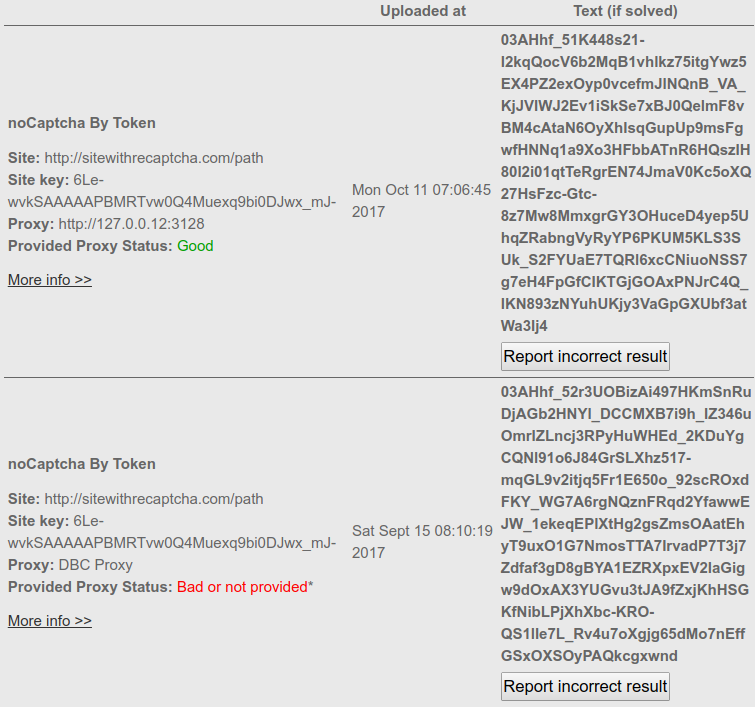
Pergi ke pengiriman sebelumnya Setelah mengunggah captcha dan periksa bidang "proxy" dan "disediakan status proxy" dari captcha yang diunggah. Jika proxy Anda digunakan untuk menyelesaikan captcha, nilai bidang "proxy" akan menjadi alamat IP proxy Anda dan "status proxy yang disediakan" akan menjadi "baik". Jika tidak digunakan, "proxy" akan memiliki "proxy dbc" sebagai nilai (artinya captcha diselesaikan dengan menggunakan salah satu proxy kami) dan "disediakan status proxy" nilai lapangan akan menjadi "buruk atau tidak disediakan". Contoh tangkapan layar:
Ganti type = 4 untuk type = 25 dan token_params untuk token_enterprise_params . Inilah contohnya.
captcha = client.decode(type=25, token_enterprise_params=json_Captcha)
    curl --header 'Expect: ' -F username=your_username_here \
                             -F password=your_password_here \
                             -F type='4' \
                             -F token_params='{"proxy": "http://user:[email protected]:1234",
                                               "proxytype": "HTTP",
                                               "googlekey": "6Lc2fhwTAAAAAGatXTzFYfvlQMI2T7B6ji8UVV_b",
                                               "pageurl": "http://google.com"}' \
                             http://api.dbcapi.me/api/captcha
curl -H "Accept: application/json" http://api.dbcapi.me/api/captcha/CAPTCHA_ID'{"status": 0, "captcha": 2911096,
"is_correct": true, "text": "textToken"}'
    /**
     * DeathByCaptcha PHP API recaptcha_v2 usage example
     *
     * @package DBCAPI
     * @subpackage PHP
     */

    /**
     * DBC API clients
     */
    require_once '../deathbycaptcha.php';

    $username = "username";  // DBC account username
    $password = "password";  // DBC account password
    $token_from_panel = "your-token-from-panel";  // DBC account authtoken

    // Use DeathByCaptcha_SocketClient() class if you want to use SOCKET API.
    $client = new DeathByCaptcha_HttpClient($username, $password);
    $client->is_verbose = true;

    // To use token the first parameter must be authtoken.
    // $client = new DeathByCaptcha_HttpClient("authtoken", $token_from_panel);

    echo "Your balance is {$client->balance} US cents\n";

    // To use recaptcha_Token
    // Set the proxy and reCaptcha token data
    $data = array(
         'proxy' => 'http://user:[email protected]:1234',
         'proxytype' => 'HTTP',
        'googlekey' => '6Le-wvkSAAAAAPBMRTvw0Q4Muexq9bi0DJwx_mJ-',
        'pageurl' => 'https://www.google.com/recaptcha/api2/demo'
    );
    //Create a json string
    $json = json_encode($data);

    //Put the type and the json payload
    $extra = [
        'type' => 4,
        'token_params' => $json,
    ];

    // Put null the first parameter and add the extra payload
    if ($captcha = $client->decode(null, $extra)) {
        echo "CAPTCHA {$captcha['captcha']} uploaded\n";

        sleep(DeathByCaptcha_Client::DEFAULT_TIMEOUT);

        // Poll for CAPTCHA indexes:
        if ($text = $client->get_text($captcha['captcha'])) {
            echo "CAPTCHA {$captcha['captcha']} solved: {$text}\n";

            // Report an incorrectly solved CAPTCHA.
            // Make sure the CAPTCHA was in fact incorrectly solved!
            //$client->report($captcha['captcha']);
        }
    }
    import deathbycaptcha
    import json

    # Put your DBC account username and password here.
    username = "username"
    password = "password"

    # you can use authtoken instead of user/password combination
    # activate and get the authtoken from DBC users panel
    authtoken = "authtoken"

    # to use socket client
    # client = deathbycaptcha.SocketClient(username, password)

    # to use authtoken
    # client = deathbycaptcha.SocketClient(username, password, authtoken)

    client = deathbycaptcha.HttpClient(username, username)

    # Put the proxy and recaptcha_v2 data
    Captcha_dict = {
        'proxy': 'http://user:[email protected]:1234',
        'proxytype': 'HTTP',
        'googlekey': '6Le-wvkSAAAAAPBMRTvw0Q4Muexq9bi0DJwx_mJ-',
        'pageurl': 'https://www.google.com/recaptcha/api2/demo'}
    # Create a json string
    json_Captcha = json.dumps(Captcha_dict)

    try:
        balance = client.get_balance()
        print(balance)

        # Put your CAPTCHA type and Json payload here:
        captcha = client.decode(type=4, token_params=json_Captcha)
        if captcha:
            # The CAPTCHA was solved; captcha["captcha"] item holds its
            # numeric ID, and captcha["text"] item it's a text token".
            print("CAPTCHA %s solved: %s" % (captcha["captcha"], captcha["text"]))

            if '':  # check if the CAPTCHA was incorrectly solved
                client.report(captcha["captcha"])
    except deathbycaptcha.AccessDeniedException:
        # Access to DBC API denied, check your credentials and/or balance
        print("error: Access to DBC API denied, check your credentials and/or balance")
import com.DeathByCaptcha.AccessDeniedException;
import com.DeathByCaptcha.Client;
import com.DeathByCaptcha.HttpClient;
import com.DeathByCaptcha.SocketClient;
import com.DeathByCaptcha.Captcha;
import org.json.JSONObject;

import java.io.IOException;

class ExampleRecaptchaV2 {
    public static void main(String[] args)
            throws Exception {

        // Put your DBC username & password or authtoken here:
        String username = "your_username_here";
        String password = "your_password_here";
        String authtoken = "your_authtoken_here";

        /* DeathByCaptcha Socket Client
           Client client = (Client) (new SocketClient(username, password));
           DeathByCaptcha http Client */
        Client client = (Client) (new HttpClient(username, password));
        client.isVerbose = true;

        /* Using authtoken
           Client client = (Client) new HttpClient(authtoken); */

        try {
            try {
                System.out.println("Your balance is " + client.getBalance() + " US cents");
            } catch (IOException e) {
                System.out.println("Failed fetching balance: " + e.toString());
                return;
            }

            Captcha captcha = null;
            try {
                // Proxy and reCAPTCHA v2 token data
                String proxy = "http://user:[email protected]:1234";
                String proxytype = "http";
                String googlekey = "6Lc2fhwTAAAAAGatXTzFYfvlQMI2T7B6ji8UVV_f";
                String pageurl = "http://google.com";
                /* Upload a reCAPTCHA v2 and poll for its status with 120 seconds timeout.
                   Put the token params and timeout (in seconds)
                   0 or nothing for the default timeout value. */
                captcha = client.decode(proxy, proxytype, googlekey, pageurl);

                //other method is to send a json with the parameters
                /*
                JSONObject json_params = new JSONObject();
                json_params.put("proxy", proxy);
                json_params.put("proxytype", proxytype);
                json_params.put("googlekey", googlekey);
                json_params.put("pageurl", pageurl);
                captcha = client.decode(4, json_params);
                */
            } catch (IOException e) {
                System.out.println("Failed uploading CAPTCHA");
                return;
            }

            if (null != captcha) {
                System.out.println("CAPTCHA " + captcha.id + " solved: " + captcha.text);

                // Report incorrectly solved CAPTCHA if necessary.
                // Make sure you've checked if the CAPTCHA was in fact incorrectly
                // solved, or else you might get banned as abuser.
                /*try {
                    if (client.report(captcha)) {
                        System.out.println("Reported as incorrectly solved");
                    } else {
                        System.out.println("Failed reporting incorrectly solved CAPTCHA");
                    }
                } catch (IOException e) {
                    System.out.println("Failed reporting incorrectly solved CAPTCHA: " + e.toString());
                }*/
            } else {
                System.out.println("Failed solving CAPTCHA");
            }
        } catch (com.DeathByCaptcha.Exception e) {
            System.out.println(e);
        }


    }
}
using System;
using System.Collections;
using DeathByCaptcha;

namespace DBC_Examples.examples
{
    public class RecaptchaV2Example
    {
        public void Main()
        {
            // Put your DeathByCaptcha account username and password here.
            string username = "your username";
            string password = "your password";
            // string token_from_panel = "your-token-from-panel";

            /* DeathByCaptcha Socket Client
               Client client = (Client) new SocketClient(username, password);
               DeathByCaptcha http Client */
            Client client = (Client) new HttpClient(username, password);

            /* To use token authentication the first parameter must be "authtoken".
            Client client = (Client) new HttpClient("authtoken", token_from_panel); */

            // Put your Proxy credentials and type here
            string proxy = "http://user:[email protected]:1234";
            string proxyType = "HTTP";
            string googlekey = "6Lc2fhwTAAAAAGatXTzFYfvlQMI2T7B6ji8UVV_b";
            string pageurl = "http://google.com";

            string tokenParams = "{\"proxy\": \"" + proxy + "\"," +
                                 "\"proxytype\": \"" + proxyType + "\"," +
                                 "\"googlekey\": \"" + googlekey + "\"," +
                                 "\"pageurl\": \"" + pageurl + "\"}";

            try
            {
                double balance = client.GetBalance();

                /* Upload a CAPTCHA and poll for its status.  Put the Token CAPTCHA
                   Json payload, CAPTCHA type and desired solving timeout (in seconds)
                   here. If solved, you'll receive a DeathByCaptcha.Captcha object. */
                Captcha captcha = client.Decode(Client.DefaultTimeout,
                    new Hashtable()
                    {
                        {"type", 4},
                        {"token_params", tokenParams}
                    });

                if (null != captcha)
                {
                    /* The CAPTCHA was solved; captcha.Id property holds
                    its numeric ID, and captcha.Text holds its text. */
                    Console.WriteLine("CAPTCHA {0} solved: {1}", captcha.Id,
                        captcha.Text);

//                  if ( /* check if the CAPTCHA was incorrectly solved */)
//                  {
//                      client.Report(captcha);
//                  }
                }
            }
            catch (AccessDeniedException e)
            {
                /* Access to DBC API denied, check your credentials and/or balance */
                Console.WriteLine("<<< catch : " + e.ToString());
            }
        }
    }
}
Imports DeathByCaptcha

Public Class RecaptchaV2
    Sub Main(args As String())

        ' Put your DBC username & password or authtoken here:
        Dim username = "username"
        Dim password = "password"
        Dim token_from_panel = "your-token-from-panel"

        ' DBC Socket API client
        ' Dim client As New SocketClient(username, password)
        ' DBC HTTP API client
        Dim client As New HttpClient(username, password)

        ' To use token auth the first parameter must be "authtoken"
        ' Dim client As New HttpClient("authtoken", token_from_panel)

        ' Proxy and recaptcha_v2 token data
        Dim proxy = "http://user:[email protected]:1234"
        Dim proxyType = "HTTP"
        Dim googlekey = "6Lc2fhwTAAAAAGatXTzFYfvlQMI2T7B6ji8UVV_b"
        Dim pageurl = "http://google.com"

        Console.WriteLine(String.Format("Your balance is {0,2:f} US cents",
                                        client.Balance))

        ' Create a JSON with the extra data
        Dim tokenParams = "{""proxy"": """ + proxy + """," +
                          """proxytype"": """ + proxyType + """," +
                          """googlekey"": """ + googlekey + """," +
                          """pageurl"": """ + pageurl + """}"

        '  Create the payload with the type and the extra data
        Dim extraData As New Hashtable()
        extraData.Add("type", 4)
        extraData.Add("token_params", tokenParams)

        ' Upload a CAPTCHA and poll for its status.  Put the Token CAPTCHA
        ' Json payload, CAPTCHA type and desired solving timeout (in seconds)
        ' here. If solved, you'll receive a DeathByCaptcha.Captcha object.
        Dim captcha As Captcha = client.Decode(DeathByCaptcha.Client.DefaultTimeout, extraData)
        If captcha IsNot Nothing Then
            Console.WriteLine(String.Format("CAPTCHA {0:d} solved: {1}", captcha.Id,
                                            captcha.Text))

            ' Report an incorrectly solved CAPTCHA.
            ' Make sure the CAPTCHA was in fact incorrectly solved, do not
            ' just report it at random, or you might be banned as abuser.
            ' If client.Report(captcha) Then
            '    Console.WriteLine("Reported as incorrectly solved")
            ' Else
            '    Console.WriteLine("Failed reporting as incorrectly solved")
            ' End If
        End If
    End Sub
End Class
' this script uses DeCaptcher API, to use this API first we need to opt-in our user
' in the following URL http://deathbycaptcha.com/user/api/decaptcher
' Is recomended to read the FAQ in that page

' this script can use authentication token instead of username/password combination
' to use this API with authentication token, first we need enable token authentication
' on users panel authentication on users panel when using authentication token the username
' must be the keyword authtoken and the password is the authentication token from users panel

VERSION BUILD=844
' we need to set a timeout to wait for the captcha solution
SET !TIMEOUT_PAGE 200
' the script go to this URL to use the API
URL GOTO=http://api.dbcapi.me/decaptcher?function=token&print_format=html
' Set our username, need to replace {{}} with username, ex.
' TAG POS=1 TYPE=INPUT:TEXT FORM=ACTION:http://api.dbcapi.me/decaptcher
'                             ATTR=NAME:username CONTENT=myusername
TAG POS=1 TYPE=INPUT:TEXT FORM=ACTION:http://api.dbcapi.me/decaptcher
                                ATTR=NAME:username CONTENT={{username}}
' replace password with our password, ex.
' TAG POS=1 TYPE=INPUT:TEXT FORM=ACTION:http://api.dbcapi.me/decaptcher
'                           ATTR=NAME:password CONTENT=mycurrentpassword
TAG POS=1 TYPE=INPUT:TEXT FORM=ACTION:http://api.dbcapi.me/decaptcher
                            ATTR=NAME:password CONTENT={{password}}
' here we set our proxy, ex.
' TAG POS=1 TYPE=INPUT:TEXT FORM=ACTION:http://api.dbcapi.me/decaptcher
'    ATTR=NAME:proxy CONTENT=https://proxy_username:proxy_password@proxy_url:proxy_port
' we need to use this proxy format https://proxy_username:proxy_password@proxy_url:proxy_port
TAG POS=1 TYPE=INPUT:TEXT FORM=ACTION:http://api.dbcapi.me/decaptcher
                                            ATTR=NAME:proxy CONTENT={{proxy}}
' here we set the proxy type ex.
' TAG POS=1 TYPE=INPUT:TEXT FORM=ACTION:http://api.dbcapi.me/decaptcher
'                                           ATTR=NAME:proxytype CONTENT=http
TAG POS=1 TYPE=INPUT:TEXT FORM=ACTION:http://api.dbcapi.me/decaptcher ATTR=NAME:proxytype
                                                                        CONTENT={{proxy_type}}
' here we set the googlekey
' for information about googlekey, look here
' http://deathbycaptcha.com/user/api/newtokenrecaptcha#what-site-key
TAG POS=1 TYPE=INPUT:TEXT FORM=ACTION:http://api.dbcapi.me/decaptcher ATTR=NAME:googlekey
                                                                CONTENT={{google_site_key}}
' here we set the site that have the token recaptcha challenge, ex.
' TAG POS=1 TYPE=INPUT:TEXT FORM=ACTION:http://api.dbcapi.me/decaptcher ATTR=NAME:pageurl
                                                        CONTENT=https://www.site.com/login
TAG POS=1 TYPE=INPUT:TEXT FORM=ACTION:http://api.dbcapi.me/decaptcher ATTR=NAME:pageurl
                                                                CONTENT={{challenge_site}}
' we submit the captcha to solve
TAG POS=1 TYPE=INPUT:SUBMIT FORM=ACTION:http://api.dbcapi.me/decaptcher ATTR=VALUE:Send

' and we get our result
TAG POS=6 TYPE=TD ATTR=* EXTRACT=TXT
SET !VAR1 {{!EXTRACT}}
/*
* DeathByCaptcha Node.js API recaptcha_v2 token image usage example
*/

const dbc = require('../deathbycaptcha');

const username = 'username';     // DBC account username
const password = 'password';     // DBC account password
const token_from_panel = 'your-token-from-panel';   // DBC account authtoken

// Proxy and recaptcha_v2 token data
const token_params = JSON.stringify({
    'proxy': 'http://username:[email protected]:3128',
    'proxytype': 'HTTP',
    'googlekey': '6Le-wvkSAAAAAPBMRTvw0Q4Muexq9bi0DJwx_mJ-',
    'pageurl': 'https://www.google.com/recaptcha/api2/demo'
});

// DeathByCaptcha Socket Client
// const client = new dbc.SocketClient(username, password);
// DeathByCaptcha http Client
const client = new dbc.HttpClient(username, password);

// To use token authentication the first parameter must be "authtoken"
// const client = new dbc.HttpClient("authtoken", token_from_panel);

// Get user balance
client.get_balance((balance) => {
    console.log(balance);
});

// Solve captcha with type 4 & token_params extra arguments
client.decode({extra: {type: 4, token_params: token_params}}, (captcha) => {

    if (captcha) {
        console.log('Captcha ' + captcha['captcha'] + ' solved: ' + captcha['text']);

        /*
        * Report an incorrectly solved CAPTCHA.
        * Make sure the CAPTCHA was in fact incorrectly solved!
        * client.report(captcha['captcha'], (result) => {
        *   console.log('Report status: ' + result);
        * });
        */
    }

});
Status: OK

Sistem kami dirancang untuk sepenuhnya ramah pengguna dan mudah digunakan. Jika Anda memiliki masalah dengan itu, cukup email kami di com, dan agen dukungan akan menghubungi Anda sesegera mungkin.



 Indonesian
 English
 Spanish
 Russian
 Chinese
 French
 Hindi
Hindi
 Arabic
 Bengali
 Portuguese