

reCAPTCHA v3 هو إجراء أمني غير مرئي جديد قدمته Google. يضيف كلمة التحقق دون إجبار المستخدم على حل أي تحد. يستخدم مفهومًا يسمى "الإجراءات" لتحديد حركة المرور الحقيقية من حركة مرور الروبوت.
تدعم خدمتنا الآن Google reCAPTCHA v3. هذه الواجهة تشبه إلى حد كبير واجهة tokens(reCAPTCHA v2) API، إلا أن اثنين من المعلمات الجديدة تمت إضافتها، واحدة لـالإجراء action وأخرى لـالحد الأدنى score.
RECAPTCHA V3 إرجاع A score من كل مستخدم ، والذي يقيم ما إذا كان المستخدم هو روبوت أو إنسان. ثم يستخدم موقع الويب قيمة score التي يمكن أن تتراوح من 0 إلى 1 لتحديد ما إذا كان سيتم قبول الطلبات أم لا. يتم تحديد الدرجات المنخفضة القريبة من 0 على أنها روبوت.
المعلمة الإجراء في RecaptCha V3 هي بيانات إضافية تستخدم لفصل عمليات التحقق من Captcha مختلفة مثل تسجيل الدخول ، التسجيل ، المبيعات ، إلخ .
في الوقت الحالي ، يكون السعر هو $ 2.89/1K Recaptcha V3 تحديات تم حلها بشكل صحيح. لن يتم إصدار فاتورة لك Captchas كما تم حلها بشكل غير صحيح. لاحظ أن هذا التسعير ينطبق على Recaptcha V3 الجديد فقط ، لذلك سيتم فرض رسوم على العملاء المذكورة فقط من العملاء الذين يستخدمون واجهة برمجة التطبيقات المحددة.
هي معلمة جديدة تتيح معالجة إجراءات المستخدم على موقع الويب بشكل مختلف.
للعثور على هذا ، نحتاج إلى فحص رمز JavaScript لموقع الويب الذي يبحث عن وظيفة Grecaptcha.execute. مثال:
grecaptcha.execute("6Lc2fhwTAAAAAGatXTzFYfvlQMI2T7B6ji8UVV_f", {action: something})
في بعض الأحيان ، من الصعب حقًا العثور عليه ونحن بحاجة إلى النظر في جميع ملفات JavaScript. قد نحاول أيضًا العثور على قيمة معلمة الإجراء داخل كائن تكوين ___grecaptcha_cfg. أيضا يمكننا الاتصال grecaptcha.execute وفحص رمز JavaScript. ستستخدم واجهة برمجة التطبيقات "التحقق" من القيمة الافتراضية إذا لم نوفر إجراءً في طلبنا.
الحد الأدنى من النتيجة اللازمة لقرار Captcha. نوصي باستخدام القيمة 0.3 دقيقة على درجة ، ويصعب الحصول على العشرات من 0.3.
مثال كامل على Token_Params:
{
  "proxy": "http://127.0.0.1:3128",
  "proxytype": "HTTP",
  "googlekey": "6Le-wvkSAAAAAPBMRTvw0Q4Muexq9bi0DJwx_mJ-",
  "pageurl": "http://test.com/path_with_recaptcha",
  "action": "example/action",
  "min_score": 0.3
}
الاستجابة لها نفس بنية captcha العادية. الرجوع إلى استطلاع حالة CAPTCHA المُحمّل للحصول على تفاصيل حول الاستجابة. سيتم تقديم الحل في مفتاح النص للاستجابة. صالح لاستخدام واحد فقط وله عمر افتراضي يبلغ دقيقة واحدة.
    curl --header 'Expect: ' -F username=your_username_here \
                             -F password=your_password_here \
                             -F type='5' \
                             -F token_params='{"proxy": "http://user:[email protected]:1234",
                                               "proxytype": "HTTP",
                                               "googlekey": "6Lc2fhwTAAAAAGatXTzFYfvlQMI2T7B6ji8UVV_b",
                                               "pageurl": "http://google.com",
                                               "action": "example/action",
                                               "min_score": 0.3}' \
                             http://api.dbcapi.me/api/captcha
curl -H "Accept: application/json" http://api.dbcapi.me/api/captcha/CAPTCHA_ID'{"status": 0, "captcha": 2911096,
"is_correct": true, "text": "textSolution"}'
    # recaptcha_v3
    import deathbycaptcha
    import json

    # Put your DBC account username and password here.
    username = "username"
    password = "password"

    # you can use authtoken instead of user/password combination
    # activate and get the authtoken from DBC users panel
    authtoken = "authtoken"

    # to use socket client
    # client = deathbycaptcha.SocketClient(username, password)

    # to use authtoken
    # client = deathbycaptcha.SocketClient(username, password, authtoken)

    client = deathbycaptcha.HttpClient(username, password)

    # Put the proxy and recaptcha_v3 data
    # recaptcha_v3 requires 'action' that is the action that triggers
    # recaptcha_v3 validation
    # if 'action' isn't provided we use the default value "verify"
    # also you need to provide 'min_score', a number from 0.1 to 0.9,
    # this is the minimum score acceptable from recaptchaV3

    Captcha_dict = {
        'proxy': 'http://user:[email protected]:1234',
        'proxytype': 'HTTP',
        'googlekey': '6Lc2fhwTAAAAAGatXTzFYfvlQMI2T7B6ji8UVV_f',
        'pageurl': 'http://google.com',
        'action': "example/action",
        'min_score': 0.3}

    # Create a json string
    json_Captcha = json.dumps(Captcha_dict)

    try:
        balance = client.get_balance()
        print(balance)

        # Put your CAPTCHA type and Json payload here:
        captcha = client.decode(type=5, token_params=json_Captcha)
        if captcha:
            # The CAPTCHA was solved; captcha["captcha"] item holds its
            # numeric ID, and captcha["text"] item it's a list of "coordinates".
            print("CAPTCHA %s solved: %s" % (captcha["captcha"], captcha["text"]))

            if '':  # check if the CAPTCHA was incorrectly solved
                client.report(captcha["captcha"])
    except deathbycaptcha.AccessDeniedException:
        # Access to DBC API denied, check your credentials and/or balance
        print("error: Access to DBC API denied, check your credentials and/or balance")
reCAPTCHA v2 Enterprise هو إصدار متقدم من reCAPTCHA v2 الذي يوفر تحليلًا أكثر تفصيلاً للمخاطر وميزات إضافية لمستخدمي المؤسسات. إنه يقدم نفس مربع الاختيار المألوف ولكن مع خيارات أمان وتخصيص محسنة.
تدعم خدمتنا الآن Google reCAPTCHA v2 Enterprise. واجهة برمجة التطبيقات هذه تشبه تمامًا واجهة برمجة التطبيقات tokens(reCAPTCHA v2). يتمثل الاختلاف الرئيسي في استخدام token_enterprise_params بدلاً من token_params.
يوفر reCAPTCHA v2 Enterprise للشركات مزيدًا من التحكم والرؤية للأنشطة المشبوهة، ويقدم درجات تفصيلية للمخاطر وميزات أمان قابلة للتكيف لتوفير حماية أفضل ضد التهديدات الآلية.
من الضروري توفير وكيل لاستخدام reCAPTCHA v2 Enterprise.
في الوقت الحالي، السعر هو 2.89/1 ألف تحديات reCAPTCHA v2 Enterprise التي تم حلها بشكل صحيح. لن يتم محاسبتك على رموز التحقق التي تم الإبلاغ عنها على أنها تم حلها بشكل غير صحيح. لاحظ أن هذا السعر ينطبق على reCAPTCHA v2 Enterprise الجديد فقط، لذلك سيتم فرض السعر المذكور فقط على العملاء الذين يستخدمون واجهة برمجة التطبيقات المحددة هذه.
مثال كامل عن token_enterprise_params:
        {
          "proxy": "http://127.0.0.1:3128",
          "proxytype": "HTTP",
          "googlekey": "6Le-wvkSAAAAAPBMRTvw0Q4Muexq9bi0DJwx_mJ-",
          "pageurl": "http://test.com/path_with_recaptcha"
        }
الاستجابة لها نفس بنية captcha العادية. الرجوع إلى استطلاع حالة CAPTCHA المُحمّل للحصول على تفاصيل حول الاستجابة. سيتم تقديم الحل في مفتاح النص للاستجابة. صالح لاستخدام واحد فقط وله عمر افتراضي يبلغ دقيقة واحدة.
        curl --header 'Expect: ' -F username=your_username_here \
                                     -F password=your_password_here \
                                     -F type='25' \
                                     -F token_enterprise_params='{"proxy": "http://user:[email protected]:1234",
                                                                   "proxytype": "HTTP",
                                                                   "googlekey": "6Lc2fhwTAAAAAGatXTzFYfvlQMI2T7B6ji8UVV_b",
                                                                   "pageurl": "http://google.com"}' \
                                     http://api.dbcapi.me/api/captcha
curl -H "Accept: application/json" http://api.dbcapi.me/api/captcha/CAPTCHA_ID'{"status": 0, "captcha": 2911096,
"is_correct": true, "text": "textSolution"}'
        # recaptcha_v2_enterprise
        import deathbycaptcha
        import json

        # Put your DBC account username and password here.
        username = "username"
        password = "password"

        # you can use authtoken instead of user/password combination
        # activate and get the authtoken from DBC users panel
        authtoken = "authtoken"

        # to use socket client
        # client = deathbycaptcha.SocketClient(username, password)

        # to use authtoken
        # client = deathbycaptcha.SocketClient(username, password, authtoken)

        client = deathbycaptcha.HttpClient(username, password)

        # Put the proxy and recaptcha_v2_enterprise data
        # Note: reCAPTCHA v2 Enterprise uses the same parameters as reCAPTCHA v2

        Captcha_dict = {
                'proxy': 'http://user:[email protected]:1234',
                'proxytype': 'HTTP',
                'googlekey': '6Lc2fhwTAAAAAGatXTzFYfvlQMI2T7B6ji8UVV_f',
                'pageurl': 'http://google.com'}

        # Create a json string
        json_Captcha = json.dumps(Captcha_dict)

        try:
                balance = client.get_balance()
                print(balance)

                # Put your CAPTCHA type and Json payload here:
                # Note: type=25 for reCAPTCHA v2 Enterprise
                captcha = client.decode(type=25, token_enterprise_params=json_Captcha)
                if captcha:
                    # The CAPTCHA was solved; captcha["captcha"] item holds its
                    # numeric ID, and captcha["text"] item it's a list of "coordinates".
                    print("CAPTCHA %s solved: %s" % (captcha["captcha"], captcha["text"]))

                    if '':  # check if the CAPTCHA was incorrectly solved
                        client.report(captcha["captcha"])
        except deathbycaptcha.AccessDeniedException:
                # Access to DBC API denied, check your credentials and/or balance
                print("error: Access to DBC API denied, check your credentials and/or balance")
إنها تحديات Recaptcha الجديدة التي تتطلب عادة من المستخدم تحديد بعض الصور والنقر فوقها. لا ينبغي الخلط بينهم وبين الكلمة/الأرقام التقليدية (تلك التي لا تحتوي على صور).
لراحتك ، قمنا بتطبيق دعم Recaptcha الجديد بواسطة رمز API. إذا كان برنامجك يعمل معه ، ويدعم الحد الأدنى من التكوين ، فيجب أن تكون قادرًا على فك تشفير Captchas باستخدام DeathByCaptcha في أي وقت من الأوقات.
نحن ندعم أيضًا حل الرمز المميز captchas من خلال 2captcha API . تحقق من ذلك!
في الوقت الحالي ، يكون السعر هو $ 2.89/1K تحديات Recaptcha Recaptcha تم حلها بشكل صحيح. لن يتم فواتيرك للحصول على صور رمزية تم الإبلاغ عنها على أنها تم حلها بشكل غير صحيح. لاحظ أن هذا التسعير ينطبق على صور recaptcha الرمز الجديد فقط ، لذلك سيتم فرض رسوم على ذلك فقط العملاء الذين يستخدمون واجهة برمجة التطبيقات المحددة.
لاستخدام Token Image API ، سيتعين عليك إرسال طلب نشر HTTP إلى http://api.dbcapi.me/api/captcha
مثال كامل على Token_Params:
{
  "proxy": "http://127.0.0.1:3128",
  "proxytype": "HTTP",
  "googlekey": "6Le-wvkSAAAAAPBMRTvw0Q4Muexq9bi0DJwx_mJ-",
  "pageurl": "http://test.com/path_with_recaptcha"
}
Google Search Captchas ، تلك المرئية ، في حين أن Google Search تثير حماية الروبوت. بدءًا من النهاية السابقة من مايو 2020 ، تتطلب الآن معلمة جديدة data-s لحل تلك captchas. في رمز Google Search Recaptcha HTML ، حدد موقع data-s وأرسلها كجزء من token_params. لاحظ أنه يمكن تحميل data-s قيمة فقط مرة واحدة ، تجنب تحميل رمز JS في نموذج Google Recaptcha. المعلمة data-s فريدة من نوعها لكل Captcha.
مثال على token_params لبحث Google Captchas:
{
  "googlekey": "6Le-wvkSA...",
  "pageurl": "...",
  "data-s": "IUdfh4rh0sd..."
}
استجابة API لصورة الرمز المميز لها نفس بنية استجابة كابتشا العادية. راجع استطلاع حالة CAPTCHA المحملة للحصول على تفاصيل. سيأتي الرمز في مفتاح text. وهو صالح للاستخدام مرة واحدة وله عمر افتراضي مدته دقيقتان. سيكون سلسلة مثل ما يلي:
       "03AOPBWq_RPO2vLzyk0h8gH0cA2X4v3tpYCPZR6Y4yxKy1s3Eo7CHZRQntxrd
        saD2H0e6S3547xi1FlqJB4rob46J0-wfZMj6YpyVa0WGCfpWzBWcLn7tO_EYs
        vEC_3kfLNINWa5LnKrnJTDXTOz-JuCKvEXx0EQqzb0OU4z2np4uyu79lc_Ndv
        L0IRFc3Cslu6UFV04CIfqXJBWCE5MY0Ag918r14b43ZdpwHSaVVrUqzCQMCyb
        cGq0yxLQf9eSexFiAWmcWLI5nVNA81meTXhQlyCn5bbbI2IMSEErDqceZjf1m
        X3M67BhIb4"
لمعرفة كيفية استخدام الرمز المميز لحل recaptcha ، يرجى الرجوع إلى كيفية استخدام الرمز المميز لحل recaptcha؟
حاليا ، فقط الوكلاء http مدعوم. سيتم إضافة دعم لأنواع أخرى في المستقبل.
هذا معرف فريد يعينه Google لكل موقع ويب يستخدم خدمة RecaptCha. للعثور على مفتاح الموقع ، اتبع هذه الخطوات:
يمكننا العثور على مفتاح البيانات الذي يتفقد العنصر أو عرض رمز مصدر الصفحة والبحث عن الاسم.

ولكن هناك بعض الحالات عندما لا يكون مفتاح البيانات هذا واضحًا ، في هذه الحالة ، حاول البحث عن كلمات مماثلة أو بعض الأوتار التي تبدأ بـ 6L ، لا توجد طريقة محددة للعثور على Sitekey ، في حالة Cryptic/Hard- من أجل الحصول على مفتاح البيانات ، نحتاج إلى الاستفادة من مهاراتنا للحصول عليها.
هناك ثلاث طرق يمكن من خلالها استخدام الرمز المميز:
الأول هو إجراء طلب POST إلى عنوان URL في سمة action النموذج مع تعيين الرمز المميز كقيمة لحقل textarea الذي يحمل معرف g-recaptcha-response. يمكن ملء الحقول الأخرى حسب الرغبة. هذه هي الطريقة الموصى بها لاستخدام الرمز المميز، نظرًا لأنها لا تتطلب محاكاة المتصفح أو تلاعب DOM.
الطريقة الثانية هي معالجة DOM. إذا كنت تقوم بتطوير برنامج نصي لحل RecaptChas ، تحقق مما إذا كانت لغة البرمجة أو الإطار الذي تستخدمه يحتوي على مكتبة لمعالجة DOM أو تنفيذ تعليمات JavaScript. يجب إكمال الخطوات التالية لاستخدام الرمز المميز بنجاح:
ملاحظة: يجب استخدام الطرق 2 و 3 فقط لأغراض الاختبار لأنها أبطأ بكثير وأكثر كثافة للموارد من أولها.
يمكن لبعض المواقع تكوين recaptcha لإعطاء رد اتصال على التحقق الناجح وتجنب استخدام نموذج إرسال ، باستخدام سمة اتخاذ التعرف على البيانات على علامة G-recaptcha أو عبر معلمة "رد الاتصال" إذا استخدمت عرضًا صريحًا.
غالبًا ما يتم تعريف وظيفة رد الاتصال في معلمة استخلاص البيانات من recaptcha ، على سبيل المثال:
data-callback="myFunction";
        grecaptcha.render('example', {
          'sitekey' : 'site-key',
          'callback' : myFunction
        });
myFunction();
جميع المواقع تنفذ reCAPTCHA بطريقتها الخاصة ، وهذا يعني أنه يجب علينا تحليل تطبيق reCAPTCHA في كل موقع قبل محاولة استخدام رمز النتائج. بمجرد التأكد من كيفية عمل هذا الموقع بشكل خاص، نحن نحصِّلُ الإجابات التى يظهرهَالـreCAPTCHA باسْتِخْدَامِ حساب المستخدم العادى لكى نفهم طريقة التطبيق . ثُمَّ، يُمْكِنُ أَنْ نَضْغَطَ على رابط API و اﻹستيراد إلى برامجٍ مثلا Python, C# or Java. ﻭﻓﺘﺢ ﺗﺤﻖ ﺫﻛﺮ ﺣﻮّز اثار رسالة "I`m not a robot" والضغط على صورٍ (أو شروح) لإثبات أنّك حاسوب؟! لضمان فهم كيفية عمل recaptcha، يُمْكِنُ إذاء قراءة توثيق reCAPTCHA v2.
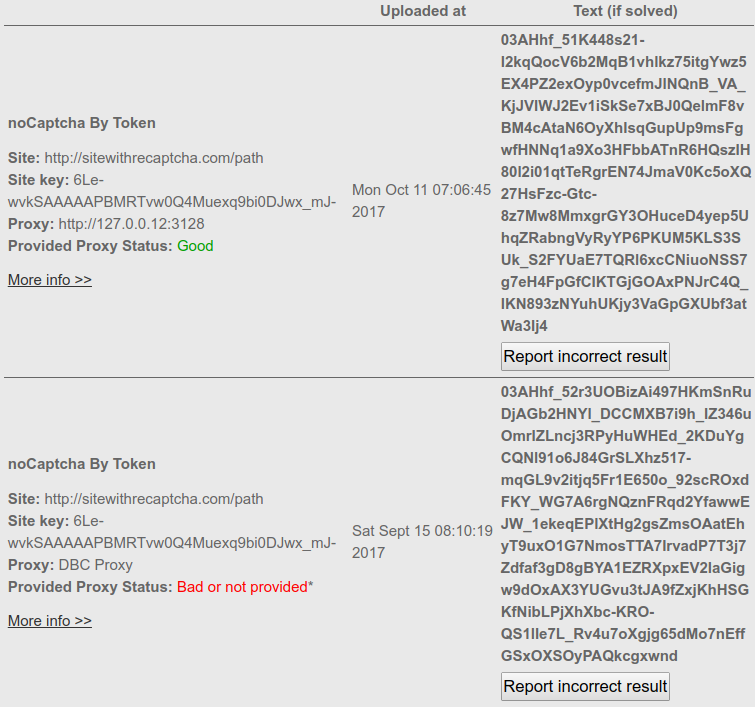
انتقل إلى التقديمات السابقة بعد تحميل captcha والتحقق من حقول "الوكيل" و "الوكيل المقدمة" في الحقول الكابتة المحملة. إذا تم استخدام وكيلك لحل CAPTCHA ، فإن قيمة حقل "الوكيل" ستكون عنوان IP الخاص بك الوكيل وستكون "حالة الوكيل المقدمة" "جيدة". إذا لم يتم استخدامه ، فإن "الوكيل" سيكون له "وكيل DBC" كقيمة (وهذا يعني أن Captcha تم حلها باستخدام أحد الوكلاء لدينا) و "أن تكون قيمة حقل الوكيل" سيئة أو غير مقدمة ". مثال لقطة الشاشة:
ﺎﺴﺘﺑﺪﻟ type = 4 ﻞـ type = 25 ﻭ token_params ﻞـ token_enterprise_params . ﻪﻧﺍ ﻢﺛﺎﻟ.
captcha = client.decode(type=25, token_enterprise_params=json_Captcha)
    curl --header 'Expect: ' -F username=your_username_here \
                             -F password=your_password_here \
                             -F type='4' \
                             -F token_params='{"proxy": "http://user:[email protected]:1234",
                                               "proxytype": "HTTP",
                                               "googlekey": "6Lc2fhwTAAAAAGatXTzFYfvlQMI2T7B6ji8UVV_b",
                                               "pageurl": "http://google.com"}' \
                             http://api.dbcapi.me/api/captcha
curl -H "Accept: application/json" http://api.dbcapi.me/api/captcha/CAPTCHA_ID'{"status": 0, "captcha": 2911096,
"is_correct": true, "text": "textToken"}'
    /**
     * DeathByCaptcha PHP API recaptcha_v2 usage example
     *
     * @package DBCAPI
     * @subpackage PHP
     */

    /**
     * DBC API clients
     */
    require_once '../deathbycaptcha.php';

    $username = "username";  // DBC account username
    $password = "password";  // DBC account password
    $token_from_panel = "your-token-from-panel";  // DBC account authtoken

    // Use DeathByCaptcha_SocketClient() class if you want to use SOCKET API.
    $client = new DeathByCaptcha_HttpClient($username, $password);
    $client->is_verbose = true;

    // To use token the first parameter must be authtoken.
    // $client = new DeathByCaptcha_HttpClient("authtoken", $token_from_panel);

    echo "Your balance is {$client->balance} US cents\n";

    // To use recaptcha_Token
    // Set the proxy and reCaptcha token data
    $data = array(
         'proxy' => 'http://user:[email protected]:1234',
         'proxytype' => 'HTTP',
        'googlekey' => '6Le-wvkSAAAAAPBMRTvw0Q4Muexq9bi0DJwx_mJ-',
        'pageurl' => 'https://www.google.com/recaptcha/api2/demo'
    );
    //Create a json string
    $json = json_encode($data);

    //Put the type and the json payload
    $extra = [
        'type' => 4,
        'token_params' => $json,
    ];

    // Put null the first parameter and add the extra payload
    if ($captcha = $client->decode(null, $extra)) {
        echo "CAPTCHA {$captcha['captcha']} uploaded\n";

        sleep(DeathByCaptcha_Client::DEFAULT_TIMEOUT);

        // Poll for CAPTCHA indexes:
        if ($text = $client->get_text($captcha['captcha'])) {
            echo "CAPTCHA {$captcha['captcha']} solved: {$text}\n";

            // Report an incorrectly solved CAPTCHA.
            // Make sure the CAPTCHA was in fact incorrectly solved!
            //$client->report($captcha['captcha']);
        }
    }
    import deathbycaptcha
    import json

    # Put your DBC account username and password here.
    username = "username"
    password = "password"

    # you can use authtoken instead of user/password combination
    # activate and get the authtoken from DBC users panel
    authtoken = "authtoken"

    # to use socket client
    # client = deathbycaptcha.SocketClient(username, password)

    # to use authtoken
    # client = deathbycaptcha.SocketClient(username, password, authtoken)

    client = deathbycaptcha.HttpClient(username, username)

    # Put the proxy and recaptcha_v2 data
    Captcha_dict = {
        'proxy': 'http://user:[email protected]:1234',
        'proxytype': 'HTTP',
        'googlekey': '6Le-wvkSAAAAAPBMRTvw0Q4Muexq9bi0DJwx_mJ-',
        'pageurl': 'https://www.google.com/recaptcha/api2/demo'}
    # Create a json string
    json_Captcha = json.dumps(Captcha_dict)

    try:
        balance = client.get_balance()
        print(balance)

        # Put your CAPTCHA type and Json payload here:
        captcha = client.decode(type=4, token_params=json_Captcha)
        if captcha:
            # The CAPTCHA was solved; captcha["captcha"] item holds its
            # numeric ID, and captcha["text"] item it's a text token".
            print("CAPTCHA %s solved: %s" % (captcha["captcha"], captcha["text"]))

            if '':  # check if the CAPTCHA was incorrectly solved
                client.report(captcha["captcha"])
    except deathbycaptcha.AccessDeniedException:
        # Access to DBC API denied, check your credentials and/or balance
        print("error: Access to DBC API denied, check your credentials and/or balance")
import com.DeathByCaptcha.AccessDeniedException;
import com.DeathByCaptcha.Client;
import com.DeathByCaptcha.HttpClient;
import com.DeathByCaptcha.SocketClient;
import com.DeathByCaptcha.Captcha;
import org.json.JSONObject;

import java.io.IOException;

class ExampleRecaptchaV2 {
    public static void main(String[] args)
            throws Exception {

        // Put your DBC username & password or authtoken here:
        String username = "your_username_here";
        String password = "your_password_here";
        String authtoken = "your_authtoken_here";

        /* DeathByCaptcha Socket Client
           Client client = (Client) (new SocketClient(username, password));
           DeathByCaptcha http Client */
        Client client = (Client) (new HttpClient(username, password));
        client.isVerbose = true;

        /* Using authtoken
           Client client = (Client) new HttpClient(authtoken); */

        try {
            try {
                System.out.println("Your balance is " + client.getBalance() + " US cents");
            } catch (IOException e) {
                System.out.println("Failed fetching balance: " + e.toString());
                return;
            }

            Captcha captcha = null;
            try {
                // Proxy and reCAPTCHA v2 token data
                String proxy = "http://user:[email protected]:1234";
                String proxytype = "http";
                String googlekey = "6Lc2fhwTAAAAAGatXTzFYfvlQMI2T7B6ji8UVV_f";
                String pageurl = "http://google.com";
                /* Upload a reCAPTCHA v2 and poll for its status with 120 seconds timeout.
                   Put the token params and timeout (in seconds)
                   0 or nothing for the default timeout value. */
                captcha = client.decode(proxy, proxytype, googlekey, pageurl);

                //other method is to send a json with the parameters
                /*
                JSONObject json_params = new JSONObject();
                json_params.put("proxy", proxy);
                json_params.put("proxytype", proxytype);
                json_params.put("googlekey", googlekey);
                json_params.put("pageurl", pageurl);
                captcha = client.decode(4, json_params);
                */
            } catch (IOException e) {
                System.out.println("Failed uploading CAPTCHA");
                return;
            }

            if (null != captcha) {
                System.out.println("CAPTCHA " + captcha.id + " solved: " + captcha.text);

                // Report incorrectly solved CAPTCHA if necessary.
                // Make sure you've checked if the CAPTCHA was in fact incorrectly
                // solved, or else you might get banned as abuser.
                /*try {
                    if (client.report(captcha)) {
                        System.out.println("Reported as incorrectly solved");
                    } else {
                        System.out.println("Failed reporting incorrectly solved CAPTCHA");
                    }
                } catch (IOException e) {
                    System.out.println("Failed reporting incorrectly solved CAPTCHA: " + e.toString());
                }*/
            } else {
                System.out.println("Failed solving CAPTCHA");
            }
        } catch (com.DeathByCaptcha.Exception e) {
            System.out.println(e);
        }


    }
}
using System;
using System.Collections;
using DeathByCaptcha;

namespace DBC_Examples.examples
{
    public class RecaptchaV2Example
    {
        public void Main()
        {
            // Put your DeathByCaptcha account username and password here.
            string username = "your username";
            string password = "your password";
            // string token_from_panel = "your-token-from-panel";

            /* DeathByCaptcha Socket Client
               Client client = (Client) new SocketClient(username, password);
               DeathByCaptcha http Client */
            Client client = (Client) new HttpClient(username, password);

            /* To use token authentication the first parameter must be "authtoken".
            Client client = (Client) new HttpClient("authtoken", token_from_panel); */

            // Put your Proxy credentials and type here
            string proxy = "http://user:[email protected]:1234";
            string proxyType = "HTTP";
            string googlekey = "6Lc2fhwTAAAAAGatXTzFYfvlQMI2T7B6ji8UVV_b";
            string pageurl = "http://google.com";

            string tokenParams = "{\"proxy\": \"" + proxy + "\"," +
                                 "\"proxytype\": \"" + proxyType + "\"," +
                                 "\"googlekey\": \"" + googlekey + "\"," +
                                 "\"pageurl\": \"" + pageurl + "\"}";

            try
            {
                double balance = client.GetBalance();

                /* Upload a CAPTCHA and poll for its status.  Put the Token CAPTCHA
                   Json payload, CAPTCHA type and desired solving timeout (in seconds)
                   here. If solved, you'll receive a DeathByCaptcha.Captcha object. */
                Captcha captcha = client.Decode(Client.DefaultTimeout,
                    new Hashtable()
                    {
                        {"type", 4},
                        {"token_params", tokenParams}
                    });

                if (null != captcha)
                {
                    /* The CAPTCHA was solved; captcha.Id property holds
                    its numeric ID, and captcha.Text holds its text. */
                    Console.WriteLine("CAPTCHA {0} solved: {1}", captcha.Id,
                        captcha.Text);

//                  if ( /* check if the CAPTCHA was incorrectly solved */)
//                  {
//                      client.Report(captcha);
//                  }
                }
            }
            catch (AccessDeniedException e)
            {
                /* Access to DBC API denied, check your credentials and/or balance */
                Console.WriteLine("<<< catch : " + e.ToString());
            }
        }
    }
}
Imports DeathByCaptcha

Public Class RecaptchaV2
    Sub Main(args As String())

        ' Put your DBC username & password or authtoken here:
        Dim username = "username"
        Dim password = "password"
        Dim token_from_panel = "your-token-from-panel"

        ' DBC Socket API client
        ' Dim client As New SocketClient(username, password)
        ' DBC HTTP API client
        Dim client As New HttpClient(username, password)

        ' To use token auth the first parameter must be "authtoken"
        ' Dim client As New HttpClient("authtoken", token_from_panel)

        ' Proxy and recaptcha_v2 token data
        Dim proxy = "http://user:[email protected]:1234"
        Dim proxyType = "HTTP"
        Dim googlekey = "6Lc2fhwTAAAAAGatXTzFYfvlQMI2T7B6ji8UVV_b"
        Dim pageurl = "http://google.com"

        Console.WriteLine(String.Format("Your balance is {0,2:f} US cents",
                                        client.Balance))

        ' Create a JSON with the extra data
        Dim tokenParams = "{""proxy"": """ + proxy + """," +
                          """proxytype"": """ + proxyType + """," +
                          """googlekey"": """ + googlekey + """," +
                          """pageurl"": """ + pageurl + """}"

        '  Create the payload with the type and the extra data
        Dim extraData As New Hashtable()
        extraData.Add("type", 4)
        extraData.Add("token_params", tokenParams)

        ' Upload a CAPTCHA and poll for its status.  Put the Token CAPTCHA
        ' Json payload, CAPTCHA type and desired solving timeout (in seconds)
        ' here. If solved, you'll receive a DeathByCaptcha.Captcha object.
        Dim captcha As Captcha = client.Decode(DeathByCaptcha.Client.DefaultTimeout, extraData)
        If captcha IsNot Nothing Then
            Console.WriteLine(String.Format("CAPTCHA {0:d} solved: {1}", captcha.Id,
                                            captcha.Text))

            ' Report an incorrectly solved CAPTCHA.
            ' Make sure the CAPTCHA was in fact incorrectly solved, do not
            ' just report it at random, or you might be banned as abuser.
            ' If client.Report(captcha) Then
            '    Console.WriteLine("Reported as incorrectly solved")
            ' Else
            '    Console.WriteLine("Failed reporting as incorrectly solved")
            ' End If
        End If
    End Sub
End Class
' this script uses DeCaptcher API, to use this API first we need to opt-in our user
' in the following URL http://deathbycaptcha.com/user/api/decaptcher
' Is recomended to read the FAQ in that page

' this script can use authentication token instead of username/password combination
' to use this API with authentication token, first we need enable token authentication
' on users panel authentication on users panel when using authentication token the username
' must be the keyword authtoken and the password is the authentication token from users panel

VERSION BUILD=844
' we need to set a timeout to wait for the captcha solution
SET !TIMEOUT_PAGE 200
' the script go to this URL to use the API
URL GOTO=http://api.dbcapi.me/decaptcher?function=token&print_format=html
' Set our username, need to replace {{}} with username, ex.
' TAG POS=1 TYPE=INPUT:TEXT FORM=ACTION:http://api.dbcapi.me/decaptcher
'                             ATTR=NAME:username CONTENT=myusername
TAG POS=1 TYPE=INPUT:TEXT FORM=ACTION:http://api.dbcapi.me/decaptcher
                                ATTR=NAME:username CONTENT={{username}}
' replace password with our password, ex.
' TAG POS=1 TYPE=INPUT:TEXT FORM=ACTION:http://api.dbcapi.me/decaptcher
'                           ATTR=NAME:password CONTENT=mycurrentpassword
TAG POS=1 TYPE=INPUT:TEXT FORM=ACTION:http://api.dbcapi.me/decaptcher
                            ATTR=NAME:password CONTENT={{password}}
' here we set our proxy, ex.
' TAG POS=1 TYPE=INPUT:TEXT FORM=ACTION:http://api.dbcapi.me/decaptcher
'    ATTR=NAME:proxy CONTENT=https://proxy_username:proxy_password@proxy_url:proxy_port
' we need to use this proxy format https://proxy_username:proxy_password@proxy_url:proxy_port
TAG POS=1 TYPE=INPUT:TEXT FORM=ACTION:http://api.dbcapi.me/decaptcher
                                            ATTR=NAME:proxy CONTENT={{proxy}}
' here we set the proxy type ex.
' TAG POS=1 TYPE=INPUT:TEXT FORM=ACTION:http://api.dbcapi.me/decaptcher
'                                           ATTR=NAME:proxytype CONTENT=http
TAG POS=1 TYPE=INPUT:TEXT FORM=ACTION:http://api.dbcapi.me/decaptcher ATTR=NAME:proxytype
                                                                        CONTENT={{proxy_type}}
' here we set the googlekey
' for information about googlekey, look here
' http://deathbycaptcha.com/user/api/newtokenrecaptcha#what-site-key
TAG POS=1 TYPE=INPUT:TEXT FORM=ACTION:http://api.dbcapi.me/decaptcher ATTR=NAME:googlekey
                                                                CONTENT={{google_site_key}}
' here we set the site that have the token recaptcha challenge, ex.
' TAG POS=1 TYPE=INPUT:TEXT FORM=ACTION:http://api.dbcapi.me/decaptcher ATTR=NAME:pageurl
                                                        CONTENT=https://www.site.com/login
TAG POS=1 TYPE=INPUT:TEXT FORM=ACTION:http://api.dbcapi.me/decaptcher ATTR=NAME:pageurl
                                                                CONTENT={{challenge_site}}
' we submit the captcha to solve
TAG POS=1 TYPE=INPUT:SUBMIT FORM=ACTION:http://api.dbcapi.me/decaptcher ATTR=VALUE:Send

' and we get our result
TAG POS=6 TYPE=TD ATTR=* EXTRACT=TXT
SET !VAR1 {{!EXTRACT}}
/*
* DeathByCaptcha Node.js API recaptcha_v2 token image usage example
*/

const dbc = require('../deathbycaptcha');

const username = 'username';     // DBC account username
const password = 'password';     // DBC account password
const token_from_panel = 'your-token-from-panel';   // DBC account authtoken

// Proxy and recaptcha_v2 token data
const token_params = JSON.stringify({
    'proxy': 'http://username:[email protected]:3128',
    'proxytype': 'HTTP',
    'googlekey': '6Le-wvkSAAAAAPBMRTvw0Q4Muexq9bi0DJwx_mJ-',
    'pageurl': 'https://www.google.com/recaptcha/api2/demo'
});

// DeathByCaptcha Socket Client
// const client = new dbc.SocketClient(username, password);
// DeathByCaptcha http Client
const client = new dbc.HttpClient(username, password);

// To use token authentication the first parameter must be "authtoken"
// const client = new dbc.HttpClient("authtoken", token_from_panel);

// Get user balance
client.get_balance((balance) => {
    console.log(balance);
});

// Solve captcha with type 4 & token_params extra arguments
client.decode({extra: {type: 4, token_params: token_params}}, (captcha) => {

    if (captcha) {
        console.log('Captcha ' + captcha['captcha'] + ' solved: ' + captcha['text']);

        /*
        * Report an incorrectly solved CAPTCHA.
        * Make sure the CAPTCHA was in fact incorrectly solved!
        * client.report(captcha['captcha'], (result) => {
        *   console.log('Report status: ' + result);
        * });
        */
    }

});
الحالة: OK

تم تصميم نظامنا ليكون سهل الاستخدام تمامًا وسهل الاستخدام. إذا كان لديك أي مشكلة في ذلك ، ما عليك سوى مراسلتنا عبر البريد الإلكتروني على  com ، وسيتواصل معك أحد وكلاء الدعم في أقرب وقت ممكن.



 Arabic
 English
 Spanish
 Russian
 Chinese
 French
 Hindi
Hindi
 Bengali
 Indonesian
 Portuguese